SSH is simple — until it isn’t.
You know the drill: you need to access that Raspberry Pi at home, but it’s trapped behind your router’s NAT. So you log into the router, fumble with port forwarding, expose your public IP, and pray nothing breaks. Or worse — you email IT asking for firewall exceptions and wait three weeks for approval.
There’s a better way that takes 5 minutes and zero router configuration.
Why NAT Breaks Everything
Your home devices live on private networks (192.168.x.x, 10.x.x.x) that are invisible to the internet. NAT shares one public IP across all your devices, which means incoming SSH connections have nowhere to go.
The traditional “solution” creates more problems:
- Security risks — Public IP exposure and misconfigured firewalls
- Complexity — Dynamic DNS, port conflicts, and broken configs
- Politics — IT departments that say “no” to everything
None of this scales when you’re managing multiple devices.
The Solution: Remote.It
Instead of fighting NAT, work with it. Use a service like Remote.It that creates secure tunnels from your device outward to a relay network.
Follow the simple steps on the getting started guide
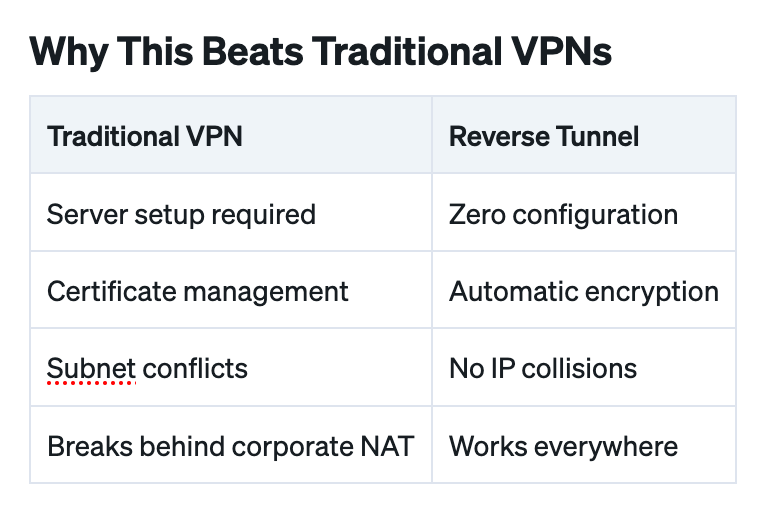
Why This Beats Traditional VPNs
Perfect For
- Home labs — Access your Raspberry Pi from the office
- Field devices — Industrial gateways with cellular connections
- Customer deployments — IoT devices you can’t physically access
- Development — Test environments behind corporate firewalls
Stop Fighting NAT
You don’t need to be a network engineer to SSH into remote devices.
Skip the router configuration. Ignore the firewall rules. Connect to your devices in minutes with tools like Remote.It — secure, fast, and works everywhere NAT exists.
Which is everywhere.